Your agents write the code.
SumCode exposes every project over MCP. Your agent reads, writes, previews and versions your work directly. Claude, Codex, Cursor, Antigravity, VS Code, or anything that speaks MCP.
Prompt the big changes. Tweak the small ones.
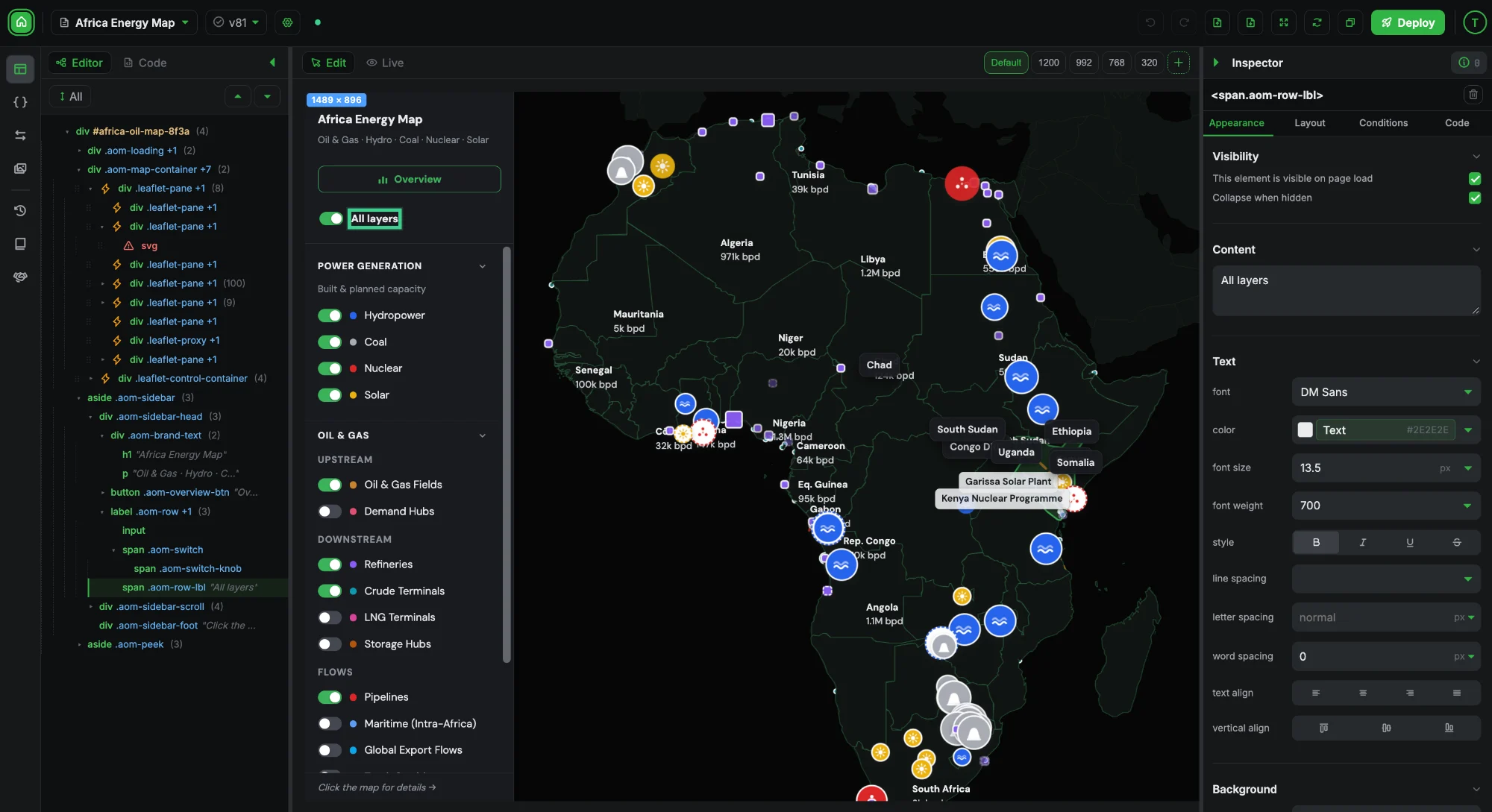
Select any element and fine-tune its spacing, colour, type and layout in the inspector. The code updates as you click, so small changes never cost a prompt.
Get started for freeShip it wherever your frontend lives.
Publish to GitHub or Netlify from the editor, or paste it into Bubble with the free SumCode Connector. It is plain HTML, CSS and JavaScript, so it runs anywhere.
Get started for freeIterate your design with confidence.
Every save is a version, tagged with the agent and the person behind it, like Claude · Sarah. Restore any one in a click.
Every edit is attributed to a person or an agent, with a timestamp and a diff.
A technical doc for every project: its data inputs, outputs and flow, kept in sync as your agent builds.
Pricing: add a monthly and annual toggle
Tighten the card spacing on mobile
Hero: swap in the new product screenshot
Button radius from 8px to 12px in the inspector
.plan-card {
37− padding: 32px;
38− gap: 24px;
39− border-radius: 10px;
37+ padding: var(--space-24);
38+ gap: var(--space-16);
39+ border-radius: var(--r-card);
40 }
Reminders
Texts each patient the day before their booking, from [[bookings]].
- GET
/bookings?date=tomorrowupcoming bookings - POST
/sms/sendone text per patient - POST
/audit/eventlogs each send - PATCH
/bookings/:id/remindedmarks it done
- Runs every day at
18:00clinic time - Never texts the same booking twice
Bring your agent.
Start building.
Connect Claude, Codex or any MCP agent in under a minute. Start with 200 free credits.
https://mcp.sumcode.io- 1Add it to your agent as a connector
- 2Sign in with your SumCode account
- 3Ask it to build your first page
---
2colors:
3 primary: "#228B22"
4 primary-deep: "#1D771D"
5 ink: "#14180F"
6 canvas: "#FCFCFA"
7---
Consistent designs
Your design system lives in SumCode. Fonts, colours and spacing become tokens your agent reads before every change, so everything it builds matches the rest of your frontend.
- Tokens for colours & fonts
- Custom breakpoints
- Checked on every edit
- Shared across projects
- Reusable components
A glass box, not a black box.
No-Code was a black box. SumCode is a glass box. Every page your agent builds is real HTML, CSS and JavaScript. You can read every line, change any of it and take it anywhere.
- Real HTML, CSS & JS
- Readable by any agent
- Every change shown in a diff
- Yours to deploy anywhere
Frequently Asked Questions
01What is SumCode?
SumCode is a visual editor for vibe-coded frontends. Your AI agent connects over MCP and writes real HTML, CSS and JavaScript that follows your design system. You fine-tune any element in the visual editor, then deploy to GitHub, Netlify or Bubble. Every change is versioned, so you can iterate safely.
02What is MCP?
MCP (Model Context Protocol) is the standard way AI agents plug into tools. SumCode runs an MCP server, so your agent can read, write, preview and version your projects directly instead of you copying code between windows.
03How do I connect my agent?
Add https://mcp.sumcode.io to your agent as a connector or MCP server, then sign in with your SumCode account. From there, ask it to build something and the work appears in your SumCode workspace.
04Which AI agents can I connect?
Any agent that speaks MCP, including Claude, Codex, Cursor, Antigravity and VS Code. If your agent supports custom MCP servers, it can work with SumCode.
05Can more than one agent or person work on the same project?
Yes. Each connection is named after the agent and the person using it, like Claude · Sarah or Codex · John. Every version records who made it, so a team can mix agents on one project and still see exactly who changed what.
06Do I need to be a strong coder?
No. Your agent writes the code. You describe what you want, then use the visual editor for the small changes. A Claude or Codex subscription is all you need to start.
07What can I change in the visual editor?
Select any element and use the inspector. Appearance covers type, colour and borders. Layout covers display, direction, size, padding and gap. Conditions show, hide or restyle an element based on data or state. Code lets you edit the element's code directly. Every change is written back into the code.
08How does SumCode follow my design system?
Your fonts, colours, spacing and radii live in SumCode as tokens. Your agent reads them before every change and uses them instead of hard-coded values, and edits are checked for colours that are not tokens. New work matches what you already have.
09Can I reuse components across pages?
Yes. Save a header, a card or any block as a reusable, then place it on as many pages as you like. Edit the reusable once and every page that uses it updates.
10Is my site responsive?
Yes. The editor previews your page at desktop, tablet and phone widths, and you can adjust styles per breakpoint so each size looks right.
11Where can I deploy?
GitHub and Netlify publish straight from the editor. For Bubble, you copy the code and paste it into the free SumCode Connector plugin or an HTML element.
12How does publishing to Netlify work?
Connect your Netlify account and publish from the editor. Each project becomes a page on your site with a shared header and footer, and the output is static HTML that search engines can read.
13How does publishing to GitHub work?
Connect a repository and SumCode commits your site to it when you publish. The code lives in your repo, so you can review it, keep history and deploy it with your own pipeline.
14How do I get my code into Bubble?
Copy the latest version from the editor and paste it into the free SumCode Connector plugin, or into a Bubble HTML element. It runs inside your app as one native element.
15Can my code read and write live Bubble data?
Yes. SumCode's token bridge pipes live Bubble fields into your code with keys like [[plans]], and output values send data back to your Bubble workflows. The setup for each key is documented in the project.
16Will custom code break my Bubble layout?
No. Your agent follows SumCode's build rules for Bubble, which cover how Bubble renders and resizes elements, so your code behaves like a native part of the page at every width.
17What happens to my Bubble data?
Nothing. Your data, workflows and hosting stay in Bubble. Your code reads and writes the same live data as the rest of your app.
18Are my changes versioned and reversible?
Yes. Every save is a version, tagged with the agent and person who made it, and you can restore any one in a click. Agents take a snapshot before each change, so experimenting is never risky.
19What is living documentation?
Each project keeps a technical document of how it works: its data inputs and outputs, the APIs it calls and how data flows through it. Your agent updates it as it builds, so the next person or agent can pick up where the last one left off.
20How much does SumCode cost?
SumCode is pay as you go, never a subscription. Every new account starts with 200 free credits, and you buy credit packs when you need more. One credit is one US cent, and every account gets every feature. See the Pricing page.